

SEO Tools PRO is a free Chrome extension that audits 16 on-page SEO factors of whichever tab you have open, including title, meta description, canonical, heading structure and schema. It gives you a full on-page check in one click, with no login and no usage limit.
Free Chrome extension
SEO Tools PRO: Instant On-Page SEO Audit
Right in Your Browser
One click. A full professional SEO report directly inside Chrome. No login. No usage limits. No cost. Runs 100% locally, no data leaves your device.
- ✓ Free forever
- ✓ No login required
- ✓ Unlimited use
- ✓ 100% local processing
- ✓ Dark mode built-in
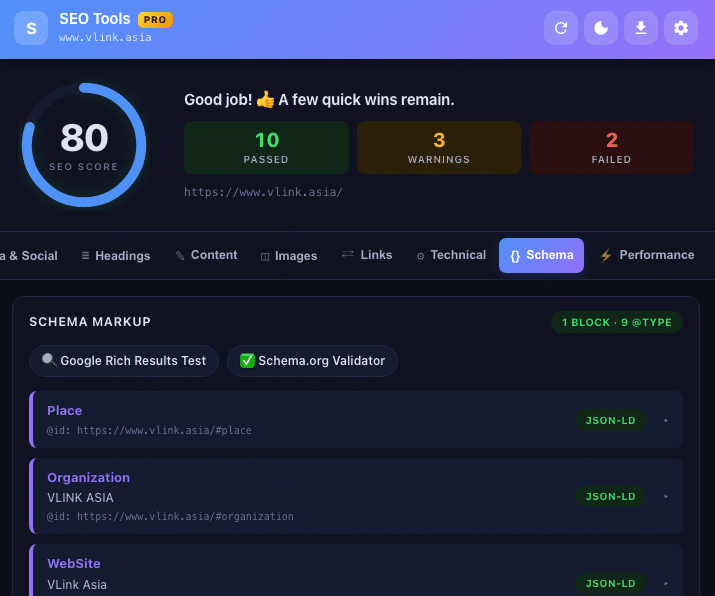
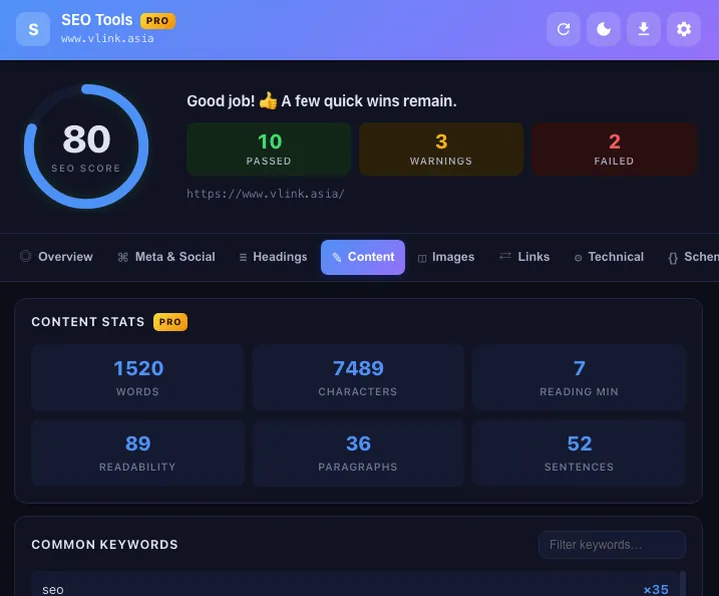
SEO Tools PRO is a Chrome extension developed by Danh Nolan that audits 16 on-page SEO factors of any open tab in under 5 seconds. Results appear in a 9-tab dashboard with a 100-point SEO score, dynamic scoring bands, and clear pass / warn / fail classification for every factor. All processing happens locally in your browser, no data ever leaves your device.
What is SEO Tools PRO?
SEO Tools PRO is a Chrome extension that analyzes every on-page SEO factor of the currently open tab directly inside the browser popup, no extra tab, no URL copying, no account. Click the extension icon and a full audit appears instantly.
How is it different from Google Search Console?
Google Search Console requires ownership verification and has a data delay of 1 to 3 days. SEO Tools PRO delivers results in real time and audits any URL open in Chrome, including competitor sites, staging environments, and localhost. The two tools serve different moments in the same SEO workflow.
Who built SEO Tools PRO?
SEO Tools PRO was built by Danh Nolan, an Information Architect and Search Intelligence strategist based in Ho Chi Minh City, Vietnam, author of the Decision Ladder Navigation™ (DLN™) framework and mentor to an active community of over 130,000 search professionals and digital practitioners.
Why do professionals need another SEO checking tool?
SEO practitioners audit dozens of URLs daily while actively optimizing. Opening DevTools or waiting for a full-site crawler does not fit that rhythm. SEO Tools PRO fills exactly that gap: instant results in a popup without leaving the page you are working on.
"Google Search Console is a free tool from Google for monitoring website performance in search results. Every SEO professional must use it, but it only provides data after Google has already crawled the page, not while you are actively optimizing."
How the 100-point SEO score works
The overall score is a weighted sum across 16 on-page factors grouped into three bands:
Does Google use this score for ranking?
No. This is an internal scoring system built by Danh Nolan to help prioritize fixes, not a Google ranking signal. A page at 90 can still rank poorly if content mismatches search intent or lacks authority. A page below 50 almost always has a technical error actively blocking indexing.
What issues do pages below 50 typically have?
At minimum one blocking error: missing canonical tag, robots disallow rule, missing H1, missing meta description, or incorrectly configured HTTPS.
What are the 16 on-page factors checked?
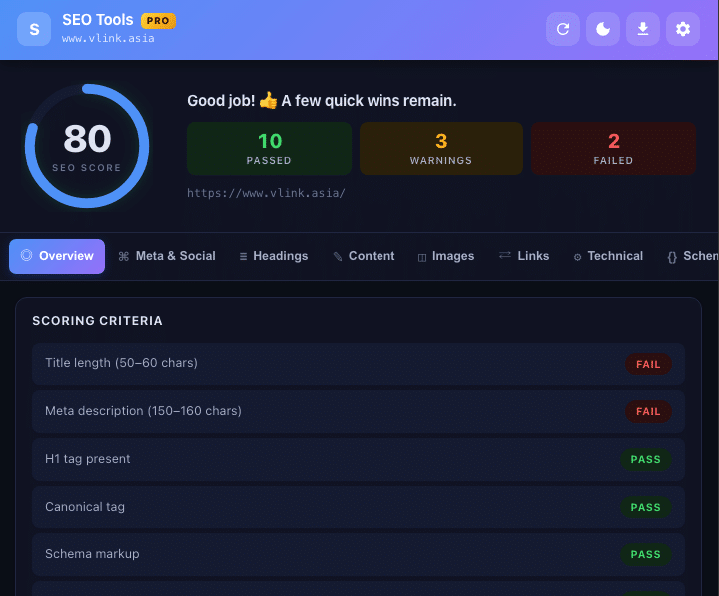
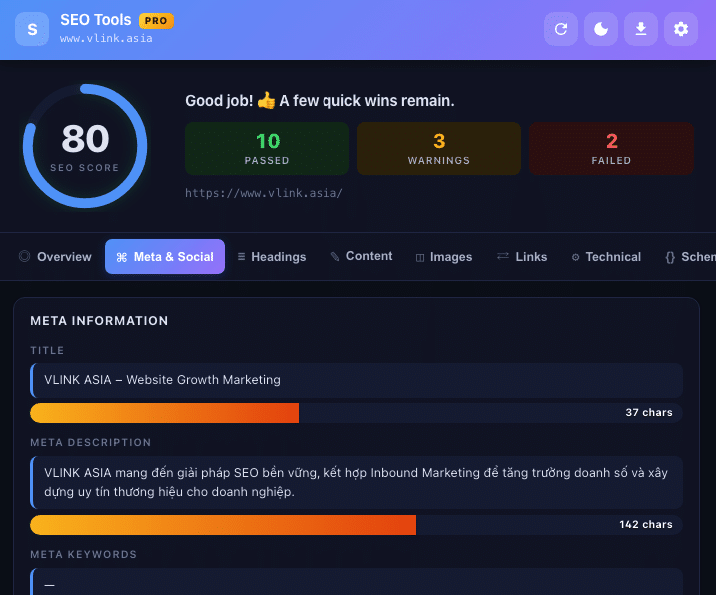
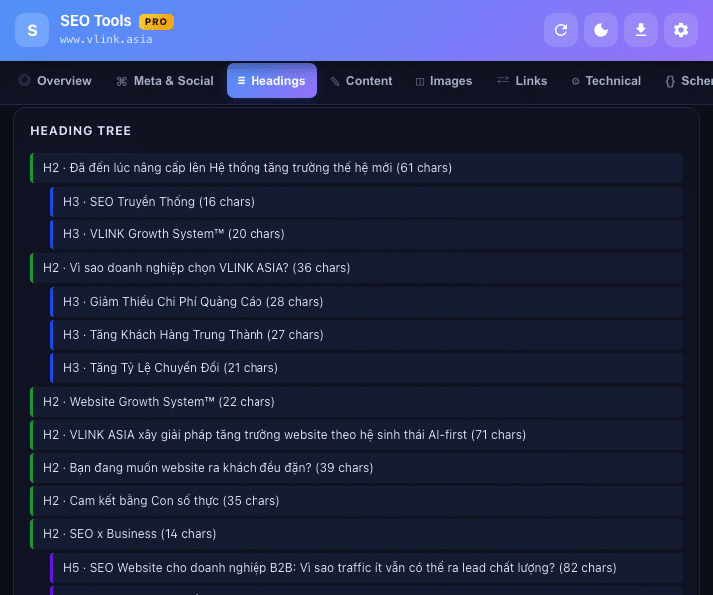
SEO Tools PRO checks 16 on-page factors and rolls them into a 100-point score, so you get one number and the reasons. The meta tags group covers title, meta description, canonical, robots and hreflang, and carries a high impact level. The heading structure group looks at whether there is a single H1 and whether H1 to H6 run in order. Each group is scored separately.
| Group | Factors checked | Impact level |
|---|---|---|
| Meta tags | Title, meta description, canonical, robots, hreflang | High |
| Heading structure | Single H1, H1-H6 order, total heading count | High |
| Technical | HTTPS, viewport, charset, HTML lang, X-Robots-Tag | High |
| Images | Alt text, width/height attributes, lazy loading status | Medium |
| Links | Empty anchor text, nofollow, internal/external ratio | Medium |
| Schema | Valid JSON-LD, @graph depth, link to Rich Results Test | Medium |
| Performance | TTFB, FCP, DOMContentLoaded, total page weight | Medium |
| Content | Word count, Flesch Readability score, keyword density | Medium |
11 core features, all completely free
All 11 feature groups below are available immediately after installation from the Chrome Web Store. No usage limits, no account required, no hidden paid version.
Schema.org JSON-LD Reader, why reading @graph matters
RankMath, Yoast, and Schema App consolidate multiple entities, WebPage, Organization, BreadcrumbList, into a single @graph array. This is Google's recommended approach: fewer HTTP requests and cleaner @id cross-references between entities.
How older tools miss @graph entirely
Many Schema checkers read only the first JSON-LD script tag in the DOM and stop. When all Schema lives in @graph inside the second script tag, those tools incorrectly report no Schema found. SEO Tools PRO scans all script tags and parses @graph in full.
Direct link to Google Rich Results Test
After parsing Schema, SEO Tools PRO provides a direct link to Google Rich Results Test for the current page, required before claiming AEO or AI Overviews eligibility.
SEO Tools PRO vs other SEO checking tools
SEO Tools PRO complements Google Search Console and Screaming Frog, it does not replace them. The three tools serve three different moments in the same workflow.
| Criterion | SEO Tools PRO | Google Search Console | Screaming Frog |
|---|---|---|---|
| Cost | Completely free | Free | Free up to 500 URLs; paid full-site |
| Login / verification | None | Google account + site verification | None |
| Audit competitor sites | Yes | No | Yes |
| Time to results | Instant (under 5 s) | 1-3 day delay | Minutes to hours |
| Full-site crawl | No (single URL) | Yes | Yes |
| Real Google data | No | Yes | No |
| Schema / JSON-LD @graph | Yes, incl. @graph | No | Paid only |
| Keyword density n-gram | Yes (1, 2, 3-gram) | No | No |
| Flesch Readability | Yes | No | No |
| Report export | JSON, CSV, HTML, Clipboard | CSV (limited) | Multiple formats |
| Localhost / staging | Yes | No | Yes |
| Data privacy | 100% local | Sends to Google | Runs locally |
On-Page SEO Checkers & Browser Extensions
When conducting live on-page audits, SEO specialists and content creators frequently rely on lightweight browser extensions to analyze page metadata, heading hierarchy, and performance metrics in real time:
- SEO Tools PRO (by Danh Nolan): Free Chrome extension that inspects 16 on-page SEO factors with a 100-point scoring algorithm, full Schema.org JSON-LD @graph parser, and local Core Web Vitals diagnostics without requiring an account or leaving the current tab.
- SEO Pro Extension: Chrome extension displaying title tags, meta descriptions, canonical URLs, robots directives, word count, Core Web Vitals, and quick CSV data export.
- SmallSEOTools: A free online web utility suite offering plagiarism checking, article rewriters, keyword density analysis, backlink monitoring, and XML sitemap generation.
- Moz Free SEO Tools: Delivers domain authority metrics, keyword difficulty exploration, backlink checking, and the MozBar browser extension for quick SERP inspection.
Top Paid SEO Platforms (2026)
While lightweight browser extensions excel at rapid on-page checks for individual URLs, scaling organic growth across an entire domain requires an enterprise SEO platform. Below are the leading paid SEO platforms in 2026:
- Novaverb (From $39/month): Next-generation AI Search and Semantic SEO intelligence platform. Engineered specifically for Topical Authority modeling, semantic Knowledge Graph architecture, Information Gain scoring, and AI Search / AEO discovery readiness. Delivers high-velocity site audits, automated internal link graph optimization, and real-time competitor keyword gap intelligence without bloated workflows. Free tier available for browser-based auditing; self-serve plans start at $39/month.
- Semrush (From $117/month): Best for keyword rank tracking, competitive PPC intelligence, historical domain comparison, and customizable agency reporting dashboards.
- Ahrefs (From $29/month): Widely recognized for its extensive backlink index, competitor link profile auditing, organic traffic valuation, and Content Gap analysis.
- SEOptimer (From $29/month): Specialized in automated white-label website audits and instant SEO performance reporting tailored for marketing agencies and client presentations.
- Surfer (From $49/month): Content optimization engine powered by real-time NLP keyword density suggestions, SERP structural guidelines, and AI writing workflows.
| Platform | Primary Core Strength | Pricing Model | Semantic & AI Search Readiness | Best Suited For |
|---|---|---|---|---|
| Novaverb | Topical Authority modeling, semantic Knowledge Graph, Information Gain, and AI Search / AEO readiness | Free tier available (Paid plans from $39/month) | Native & Advanced (Entity + AEO) | Modern SEO teams, topical authority builders, and AI-ready brands |
| Semrush | Keyword rank tracking, PPC advertising analytics, and custom client dashboards | From $117/month | Add-on AI features | Full-service digital agencies and paid/organic marketing teams |
| Ahrefs | Backlink index depth, live link monitoring, and competitor Content Gap mapping | From $29/month (Lite from $99/mo) | Traditional search index focused | Link builders, technical SEOs, and backlink audit specialists |
| Surfer | Real-time NLP content guidelines, keyword density, and SERP content scoring | From $49/month | NLP-assisted content editing | Copywriters, content creators, and on-page optimization editors |
| SEOptimer | Automated white-label audits and fast PDF client reporting | From $29/month | Basic audit heuristics | Small agencies, freelance consultants, and web dev shops |
In practice, modern SEO teams do not rely on a single tool. A streamlined workflow pairs a friction-free browser extension like SEO Tools PRO for day-to-day on-page verification with an enterprise platform like Novaverb, Semrush, or Ahrefs to orchestrate full-site topical authority, semantic link architecture, and competitive market dominance.
"A browser extension is a small software module for customizing a web browser. Browsers typically allow a variety of extensions, including user interface modifications, cookie management, ad blocking, and the custom scripting and styling of web pages."
Page performance, TTFB, FCP, and Core Web Vitals
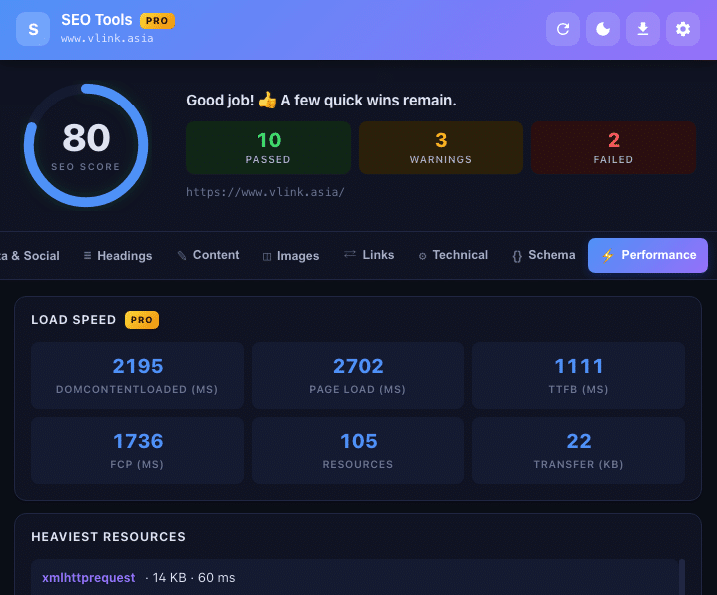
SEO Tools PRO reads directly from the browser's Navigation Timing API and Resource Timing API, delivering results that reflect real user experience on the current device, not lab data from an external server.
What is TTFB and when should you act?
TTFB (Time to First Byte) measures from request sent to first byte received, reflecting hosting speed, caching, and CDN. Redirect chains (RFC 9110 §15.4) inflate TTFB because each hop adds a full round-trip. TTFB above 600 ms typically points to hosting tier, caching plugin, or missing CDN. See Google Search Central: Core Web Vitals.
How does FCP affect ranking?
FCP (First Contentful Paint) measures time until the first content appears on screen. Google uses Core Web Vitals, where LCP is closely related to FCP, as a ranking signal especially on mobile. FCP above 1.8 seconds on a typical connection warrants investigation.
Top 10 heaviest resources
SEO Tools PRO lists the 10 largest resources loading on the page: images, JavaScript, CSS. The fastest starting point for reducing total page weight without running a full Lighthouse audit.
| Metric | Good | Needs improvement | Poor | SEO Tools PRO data source |
|---|---|---|---|---|
| TTFB | Below 600 ms | 600 ms - 1800 ms | Above 1800 ms | Navigation Timing API, responseStart |
| FCP (First Contentful Paint) | Below 1.8 s | 1.8 s - 3.0 s | Above 3.0 s | Paint Timing API, first-contentful-paint |
| DOMContentLoaded | Below 2.0 s | 2.0 s - 4.0 s | Above 4.0 s | Navigation Timing API, domContentLoadedEventEnd |
| Total page weight | Below 1 MB | 1 MB - 3 MB | Above 3 MB | Resource Timing API, transferSize (cumulative) |
| Redirect hops (RFC 9110 §15.4) | 0 hops | 1 hop | 2 or more hops | HEAD probe + Location header tracking |
Link analysis, internal, external, and rel attributes
SEO Tools PRO classifies every link: internal, external, nofollow, sponsored, ugc, empty anchors, and missing anchor text. Filter by type and jump directly to link targets.
Why distinguish nofollow, sponsored, and ugc?
Google treats these three differently (RFC 8288 §3.3, extended by Google Search Central): rel="sponsored" for paid or advertising links, rel="ugc" for user-generated content, and rel="nofollow" for all other cases. Misuse can trigger a spam policy violation. Reference: Google Search Central: qualify outbound links.
Why does empty anchor text matter for SEO?
Links with empty or non-semantic anchor text pass no topical signal to Google about the destination page. SEO Tools PRO flags and lists all such links so they can be reviewed and prioritized for repair.
| rel value | Standard | Meaning | When to use | SEO Tools PRO detects |
|---|---|---|---|---|
nofollow |
Google Search Central (RFC 8288 extension) | No PageRank transfer to destination | Unverified or un-endorsed links | Yes |
sponsored |
Google Search Central (RFC 8288 extension) | Paid or advertising link | Banners, affiliate links, sponsored content | Yes |
ugc |
Google Search Central (RFC 8288 extension) | User-generated content | Comments, forums, reviews | Yes |
alternate |
RFC 8288 §6.7.1, IANA-registered | Alternate version of the page | hreflang, AMP, RSS feeds | Yes |
noopener |
HTML Living Standard §7.1.5.1 | New tab cannot access window.opener | All external target="_blank" links | Yes |
Keyword density and stop word filtering
The keyword density analyzer supports three n-gram levels: unigrams, bigrams, and trigrams. Results include percentage bars for easy comparison of repetition levels.
Why is a separate stop word list for Vietnamese necessary?
Vietnamese has many high-frequency function words, "và" (and), "của" (of), "là" (is), that appear uniformly across all content. Without filtering them, these words dominate results and hide the keyword phrases that actually matter. SEO Tools PRO includes a dedicated Vietnamese stop word list alongside the English one.
What keyword density is appropriate?
Google does not publish a target. Per Google Search Essentials spam policies, the principle is to write for readers, not to stuff keywords. Topical vocabulary coverage across the full subject matters more than density. Learn more in the DLN Framework documentation.
Technical SEO check, robots.txt, sitemap.xml, and more
The technical check group covers factors that directly affect how Googlebot crawls and indexes pages.
Why audit robots.txt inside the extension?
A single robots.txt misconfiguration (RFC 9309) can block Googlebot from an entire website with no direct warning. SEO Tools PRO probes the file using HEAD (RFC 9110 §9.3.2); if the server returns 405, it falls back to Range-GET (RFC 9110 §14.2). Any 3xx redirect chain on robots.txt is also reported (RFC 9110 §15.4). Reference: Google Search Central: intro to robots.txt.
What is X-Robots-Tag?
X-Robots-Tag is an indexing directive delivered via HTTP response header (RFC 9110 §7.4) rather than an HTML meta tag, applicable to PDFs, images, and other non-HTML resources. SEO Tools PRO reads and displays the X-Robots-Tag value when present.
| Type / Directive | RFC / Source | SEO meaning | Googlebot behavior | SEO Tools PRO detects |
|---|---|---|---|---|
| 301 Moved Permanently | RFC 9110 §15.4.2 | Transfers all ranking signals to new URL | Updates index, passes PageRank | Yes |
| 302 Found | RFC 9110 §15.4.3 | Temporary redirect; signals stay on original | Crawls both URLs; no PageRank transfer | Yes |
| 307 Temporary Redirect | RFC 9110 §15.4.8 | Method-preserving temporary redirect | Similar to 302, method-safe | Yes |
| 308 Permanent Redirect | RFC 9110 §15.4.9 | Method-preserving permanent redirect | Similar to 301, method-safe | Yes |
| X-Robots-Tag: noindex | RFC 9110 §7.4, Google Search Central | Prevents indexing; applies to non-HTML resources | Crawls but does not index | Yes |
| robots.txt Disallow | RFC 9309, HEAD (RFC 9110 §9.3.2) | Blocks crawl; does not prevent index via inlinks | Does not crawl; may still index from inlinks | Yes |
Do Open Graph and Twitter Card affect SEO?
Not directly as ranking signals, but missing Open Graph tags cause shared links on Facebook or X to display incorrectly or use the wrong image, reducing click-through rates from social media.
Who should use SEO Tools PRO?
SEO Tools PRO is aimed at people who audit pages all day rather than occasionally. Hands-on SEO professionals use it to check dozens of URLs a day without leaving the page they are optimizing. Agencies and freelancers use it to export an HTML report live in a client meeting, so issues are visible without a paid suite. If you audit daily, it pays for itself.
How to install SEO Tools PRO in 2 minutes
Installation takes about 2 minutes and two clicks. First, open the Chrome Web Store and go to the SEO Tools PRO listing using the link below, which requires Google Chrome version 90 or later. Second, click Add to Chrome. A permissions dialog appears, and the extension requests only the activeTab permission. Nothing else is asked of you.
- Open the Chrome Web StoreGo to the SEO Tools PRO listing using the link below. Requires Google Chrome version 90 or later.
- Click "Add to Chrome"A permissions dialog appears. The extension requests only the activeTab permission to read content of the currently open tab.
- Confirm installationClick "Add extension." Download and installation complete automatically within a few seconds.
- Pin the extension to your toolbarClick the puzzle piece icon at the top-right of Chrome, find SEO Tools PRO, and click the pin icon.
- Navigate to any page and start auditingGo to the page you want to audit, click the SEO Tools PRO icon. The full 9-tab report appears instantly.
Requires Google Chrome 90+, Compatible with Microsoft Edge
After installing, explore how on-page optimization connects with architectural design in the Decision Ladder Navigation™ (DLN™) framework. For cross-channel click-through expectations, see our CTR Benchmarks by Industry guide.
Frequently asked questions about SEO Tools PRO
Is SEO Tools PRO really free, or is there a hidden paid version?
Completely free with no usage limits and no hidden paid tier. All 11 feature groups are available immediately after installation from the Chrome Web Store, no email address, no credit card, no account registration required.
Can I audit competitor websites or any URL I want?
Yes. SEO Tools PRO audits any URL currently open in Chrome, including competitor sites, staging environments, and localhost, with no site ownership verification required. This is a key difference from Google Search Console.
Does the 100-point score reflect how Google ranks the page?
No. This is an internal scoring system built by Danh Nolan to prioritize technical fixes, not a Google ranking signal. A page at 90 points can still rank poorly if content mismatches search intent or lacks authority. A page below 50 almost always has a technical error actively blocking indexing.
Why can SEO Tools PRO read @graph in JSON-LD when most other tools cannot?
RankMath, Yoast, and Schema App bundle multiple entities into a single @graph array. Many older tools read only the first JSON-LD script tag and stop, missing everything in @graph. SEO Tools PRO scans all script tags and parses the full @graph structure, then links directly to Google Rich Results Test, the required verification step for AEO or AI Overviews eligibility.
TTFB is above 600 ms, what should I do?
TTFB above 600 ms is worth investigating. The three most common root causes are an underpowered hosting tier, no caching plugin, and no CDN. Redirect chains (RFC 9110 §15.4) also inflate TTFB since each hop adds a round-trip. Measure at several different times before deciding to upgrade infrastructure.
Can I audit pages running on localhost during development?
Yes. Because SEO Tools PRO processes entirely in the browser, it can audit any URL Chrome can open, including localhost (RFC 3986 §3.2.2) and internal IP addresses. Particularly useful for developers verifying JSON-LD Schema, Open Graph, and heading structure before pushing to staging or production.
What happens if robots.txt is misconfigured?
A misconfigured robots.txt (RFC 9309) can block Googlebot from an entire website with no direct notification. This is the most severe and most common error introduced after WordPress migrations or updates. SEO Tools PRO automatically probes the file with a HEAD request (RFC 9110 §9.3.2) on every audit.
Does SEO Tools PRO work with Microsoft Edge?
Yes. Microsoft Edge is Chromium-based and supports Chrome Web Store extensions natively. Install from the Chrome Web Store while in Edge and it works with full functionality, same 11 feature groups, same 100-point scoring, same local processing with no data transmitted.
Can SEO Tools PRO replace my paid SaaS SEO platform?
No. SEO Tools PRO handles real-time on-page analysis for individual URLs while you are actively optimizing. Paid SaaS platforms are stronger for rank tracking, large-scale site crawls, backlink data, and historical trends. The two serve different moments in the same workflow and work best used together. See the DLN Framework documentation.
I am new to SEO, should I start with SEO Tools PRO or Google Search Console?
Use both from the start, they serve different purposes. SEO Tools PRO lets you observe on-page factors on any page while learning, building strong pattern recognition fast. Google Search Console shows how Google actually processes your own website. Start by reading the DLN Framework and observing how top-ranking pages structure their information.
Will fixing the issues SEO Tools PRO finds actually help my site rank?
Fixing technical errors removes barriers, it does not automatically create rankings. Think of it as a temperature reading: it tells you something is wrong, it is not the cure. Rankings depend on content quality, intent match, authority, and many other factors. That said, pages below 50 almost always have errors actively blocking indexing, fixing those first delivers the highest ROI of any technical SEO action.
Does SEO Tools PRO handle Vietnamese language content accurately?
Yes. The keyword density analyzer includes a dedicated Vietnamese stop word list alongside the English one, ensuring Vietnamese pages produce accurate n-gram results without noise from high-frequency function words. Danh Nolan is based in Vietnam and SEO Tools PRO is built specifically to handle Vietnamese content correctly, a gap that most international tools leave unfilled.
How to install and use SEO Tools PRO in Chrome
These steps take you from the Chrome Web Store listing to a full on-page audit of any open tab, in about 2 minutes and with no login or account.
- Open the Chrome Web StoreGo to the SEO Tools PRO listing in the Chrome Web Store. The extension requires Google Chrome version 90 or later.
- Click Add to ChromeA permissions dialog appears. The extension requests only the activeTab permission, which lets it read the content of the currently open tab.
- Confirm the installationClick Add extension in the dialog. Download and installation complete automatically within a few seconds, with no login or account required.
- Pin the extension to your toolbarClick the puzzle piece icon at the top-right of Chrome, find SEO Tools PRO in the list, and click the pin icon.
- Open a page and run the auditGo to the page you want to audit and click the SEO Tools PRO icon. The full 9-tab report appears instantly.
- Fix failing factors firstStart with items marked fail, such as a missing canonical tag, missing H1, robots disallow rule, or missing meta description, then work through the warnings.
- Export the report for clientsExport results as JSON, CSV, or standalone HTML to send to clients, or copy a formatted summary to the clipboard.
FAQ about SEO Tools PRO
Direct answers to frequently asked questions about SEO Tools PRO, based on real-world implementation data, systematic technical audits, and verified production performance.
Why do my shared links show the wrong image on Facebook or X?
Missing Open Graph tags cause shared links on Facebook or X to display incorrectly or use the wrong image, which reduces click-through rates from social media. SEO Tools PRO analyzes Open Graph and Twitter Card tags and shows a live preview of how the link will look when shared.
My page loads slowly, how do I find which files make it heavy?
SEO Tools PRO lists the 10 largest resources loading on the page, including images, JavaScript, and CSS. That list is the fastest starting point for reducing total page weight without running a full Lighthouse audit. Total page weight below 1 MB counts as good, and above 3 MB counts as poor.
Why does a page stay out of Google even though the HTML has no noindex meta tag?
An X-Robots-Tag header may be the cause. X-Robots-Tag is an indexing directive delivered via HTTP response header, applicable to PDFs, images, and other non-HTML resources. A noindex value there prevents indexing while Googlebot still crawls. SEO Tools PRO reads and displays the X-Robots-Tag value when present.
What image problems commonly drag down an on-page SEO audit?
Missing alt text, missing width and height attributes, and lazy load status are the image issues SEO Tools PRO checks. The extension detects each one across the full page and shows a thumbnail preview per image, so you can spot problems without opening DevTools.
What are the three scoring bands in the SEO Tools PRO score?
The score uses three bands. 80+ means Good and counts as Pass, 50-79 means Needs attention and counts as Warn, and below 50 means Critical errors and counts as Fail. Each factor also gets its own pass, warn, or fail classification so you know what to fix first.
Which report formats can SEO Tools PRO export for clients?
SEO Tools PRO exports a report as JSON, CSV, or standalone HTML, and can copy a formatted summary to the clipboard. Agencies and freelancers can export an HTML report live in a client meeting so issues are visible without a paid suite.
What does the content and readability check measure?
The content and readability check reports word count, sentence count, reading time, and Flesch Readability score. Together these numbers show whether a page is too thin or too dense. The keyword density analyzer adds ranked unigrams, bigrams, and trigrams with percentage bars.
Which redirect status codes does SEO Tools PRO detect, and how do they differ?
SEO Tools PRO detects 301, 302, 307, and 308 redirects. A 301 transfers all ranking signals to the new URL, while a 302 is temporary and signals stay on the original. 307 and 308 are the method-preserving versions, similar to 302 and 301. Each redirect hop adds a full round-trip to TTFB.
Is there a free Chrome extension for checking on-page SEO?
Yes. SEO Tools PRO is a free Chrome extension that audits 16 on-page SEO factors of any open tab in under 5 seconds. SEO Tools PRO needs no login, has no usage limit, and runs 100% locally in the browser, so no page data leaves your device.
SEO Tools PRO vs Screaming Frog, what is the difference?
SEO Tools PRO audits a single URL in under 5 seconds, while Screaming Frog crawls a full site and takes minutes to hours. Screaming Frog is free up to 500 URLs and paid for full-site crawls, and reads @graph Schema only in the paid version. SEO Tools PRO is completely free, including @graph parsing and n-gram keyword density.
Is SEO Tools PRO safe to use on private or staging sites?
Yes. SEO Tools PRO runs 100% locally in the browser and does not collect, transmit, or store any personal data or page content. SEO Tools PRO has no tracking, no analytics, and no account, and requests only the activeTab permission, so the extension is safe to use on internal staging environments or sensitive pages.
What is a good TTFB and FCP for SEO?
For SEO, a good TTFB is below 600 ms and a good FCP is below 1.8 s, based on Google Search Central thresholds. TTFB between 600 ms and 1800 ms needs improvement, and FCP between 1.8 s and 3.0 s needs improvement. SEO Tools PRO reads both values from real browser timing APIs on the current device.